General Questions
- What is the difference between an email forward and a POP mail account?
- How do I configure the mail settings on my mail program?
- How do I read and send mail by web browser?
- How do I set up new email accounts or forwards?
- What spam filter does Clifty WebWorks use?
- Where is mail identified as spam directed? Can I view the mail that is caught by the spam filter?
- Can I train the spam filter to better differentiate between spam and real mail? Can I whitelist addresses so that mail from my friends will never be identified as spam?
- Are there other things I should know about the spam filter?
- Are there any other precautions I can take to avoid spam?
NOTE: For all the examples below, substitute your own domain name for yourdomain.com
- With an email account, the mail is directed to our server. It is stored there until you use an email program to download the mail to your local PC, Mac, or other computer. Another term for email accounts is POP (Post Office Protocol) account.
- With an email forward, you set up an alias so that mail sent to an email address is then directed to one or more different addresses. These addresses may be POP accounts on our server, or addresses you may have set up with other agencies, e.g., your ISP. For example, if you already have your mail program set up to read mail from an account joe@someotheraddress.biz, you can have all email sent to sales@yourdomain.com forwarded to joe@someotheraddress.biz.
How do I configure the mail settings on my mail program?
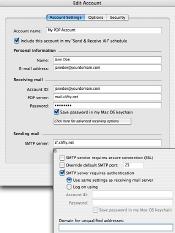
If you use a mail program such as Outlook Express or Eudora to retrieve your email from a POP mail account under your domain name, you will need to configure your mail settings so that the Username is your email address (including the domain name). For example, if you have an email account named popname on domain yourdomain.com, you would use the following mail settings:
You will also need to select SMTP authorization. To the left is an example of an account set up for janedoe@yourdomain.com on the email program Microsoft Entourage for Mac
(click on it to reveal larger image).
If you can receive mail with the above settings, but have trouble sending mail, here are some things to try.
How do I read and send mail by web browser?
If you have a POP account on our server, you can read and send email via SquirrelMail at http://host.clifty.net/webmail/
Simply login with the user name (the email address of the POP account) and your password.
How do I set up new email accounts or forwards?
You can use our QMailAdmin program to create new email forwards and/or email POP accounts. Simply log in to http://216.15.227.2/cgi-bin/qmailadmin. The user account should be postmaster; also enter your domain name and FTP password.
NOTE: If you want your new email address to work with our spam filter, you will also need to alert us of domain where you have created forwards or accounts. QmailAdmin will not automatically add new addresses to the spam filter. You can use this form to contact us about any new email addresses.
What spam filter does Clifty WebWorks use?
As of Sunday, 7 June 2009, we are using a virtual server installed with Anti-Spam vMailGuard.
Where is mail identified as spam directed? Can I view the mail that is caught by the spam filter?
- If the spam was sent to to you via one of your email forwards, you can find the mail in the BulkMail folder for the account postmaster@yourdomain.com. One way to find this folder is to use SquirrelMail (see above). The password for postmaster@yourdomain.com should be the same as your FTP password.
- If the mail was sent directly to a POP email account on our server, you can find the mail in the BulkMail folder for that account. Again, you can use SquirrelMail (see above) to access this folder.
It is a good idea to check these folders occasionally in case any real mail has been accidentally misidentified as spam. Any mail left in these BulkMail folders will be deleted after 30 days.
Can I train the spam filter to better differentiate between spam and real mail? Can I whitelist addresses so that mail from my friends will never be identified as spam?
Among its many features, the Anti-Spam vMailGuard has a Bayesian filter that can be trained to better classify email into spam and non-spam.
- If you receive spam in your inbox, you may (if you wish) simply forward it to spam@yourdomain.com. This won't guarantee that similar mails will be identified as spam—since the filter tries to be very careful not to block legitimate mail—but training the Bayesian scoring in this way will change the scoring some and help the filter to some extent.
- Likewise, if you receive real mail in your BulkMail folder, i.e., misidentified as spam, simply forward it to notspam@yourdomain.com
- If you receive mail from someone you wish to whitelist (so their email will never be classified as spam), simply forward an email from them to whitelist@yourdomain.com
Any time you forward an email to train the spam filter, you will receive a confirmation email. You can recognize these by the subject line, as they will start with "Spam report:", "Not-spam report:", or "Whitelist addition report".
Are there other things I should know about the spam filter?
- If you use QMailAdmin, you may notice that the first destination set for your forwards is preline procmail -p -m /home/vpopmail/vpoprc.forward. This is the script that directs spam to your BulkMail folder. It needs to be among the forward's destinations, and it needs to be the first one listed. If this is not the case, or if you accidentally delete it with QMailAdmin, please let us know so we can re-install it.
- As mentioned, it is important to let us know if you add any emails—either forwards or accounts—to your domain. That way we can add those emails to the Anti-Spam vMailGuard.
- As mentioned, it is wise to check your BulkMail folders occasionally for any real mail misidentified as spam, as mail in these folders is deleted once it is over 30 days old.
- Any mail sent to a forward with the word SPAM (all capital letters) in the Subject line will automatically be treated as spam and directed to the BulkMail folder.
Are there any other precautions I can take to avoid spam?
Most importantly, try to stay off spam lists. If the people who send spam don't have your email, it will be much harder for them to reach you:
- Do not give your email address to anyone who doesn't need it.
- Do not respond to spam. Do not click on links in spam. Lots of SPAM mails have "Unsubscribe" buttons or links. Do not use them or reply to the message; this would confirm to the sender that you do exist and are a target for spam.
- If possible, do not list your email on your web page. Some spambots can read these and add them to their email lists. One way to allow viewers to email you without directly listing your address is to use CAPTCHA, or else use a form where your email does not appear in the HTML source on the web page. One excellent free source for hiding your email via CAPTCHA code is reCAPTCHA Mailhide; an example of an email hidden in this way: email us
In addition, a good precaution to take is to use QMailAdmin to set your "catch all account" to "bounced" (or deleted). Otherwise, any email sent to your domain—even made up addresses—will be forwarded to your default email.
If these do not answer your questions, please do not hesitate to contact us.







